The land
Real ground, a real photograph, real names.
Real public land in 3D
Four real places to drive: the Beaverhead-Deerlodge, Custer Gallatin and Lolo national forests in Montana, and the
desert near Quartzsite, Arizona. The ground is the federal elevation survey (1-meter lidar around the campsites),
draped in the federal aerial photo.
HowPick a forest on the title screen.
Where you are
The top bar names the forest and the state, and the campsite once you are within about 500 feet. Your first
visit to each forest opens a card that says where you are.
ButtonWhere am I again? on Help and About
Real right now
One sheet listing everything on screen that comes from a real record (the sky, forecast, smoke, fire rules,
space station, ground, photo and campsite) and how old each one is.
ButtonReal right now on the title screen and by the fire
PhoneMore, any time
Name a ridge
Tap a far ridge or peak and the game names it from the federal place-name record, with its height and how far
away it is. Where the record has no name, it says so.
KeyP names the ridge in the middle of the picture
TouchTap the ridge
High point
The highest spot on the open mapped roads, with the named summits you can see from it. Best near sunset.
ButtonHigh point of the mapped roads in the Drive list
Water in the aerial photo
Next to the water the record names, the campsite card says what the aerial photo shows there: the water’s
color, or that it is mapped as water but dry in the photograph.
By itselfOn campsite cards
Closed gates
Where the Forest Service map says a road is closed to vehicles today, a gate stops the rig. Routes go around it,
and you can walk past. So far in the Lolo, the forest whose road map carries dates.
ButtonsWalk past the gateFind another way
Getting around
Drive, walk, look around, and always know the way back.
Drive and walk
Hold the big button to drive toward wherever you are looking. Get out to walk a campsite on foot; the rig stays
parked where you left it.
KeysW↑ drive S↓ back up
AD steer E walk Shift walk faster
ButtonsHold this down to driveWalk then Back in the rig
Back upMore then Back up
Thumbstick
On a touch screen, put your left thumb on the lower left of the picture and push: up to go, down to back up,
sideways to steer (on foot, to turn). Your right thumb drags to look around.
PhoneAppears under your thumb. The Stick switch under More turns it off.
Self Drive (Drive)
Pick a campsite, tap Drive me there, and the rig drives itself along the real mapped roads while the light goes
down. Let it run ×4 or ×12 to wait less; the miles, daylight and fuel stay the same.
KeysC the campsite list Esc take the wheel back
ButtonDrive then Drive me there
PhoneMore, then Drive
Forest map
A map of this forest’s roads, the stretches you have driven, the campsites and where you are.
KeyM
ButtonMap
PhoneIn the bottom bar
Compass band
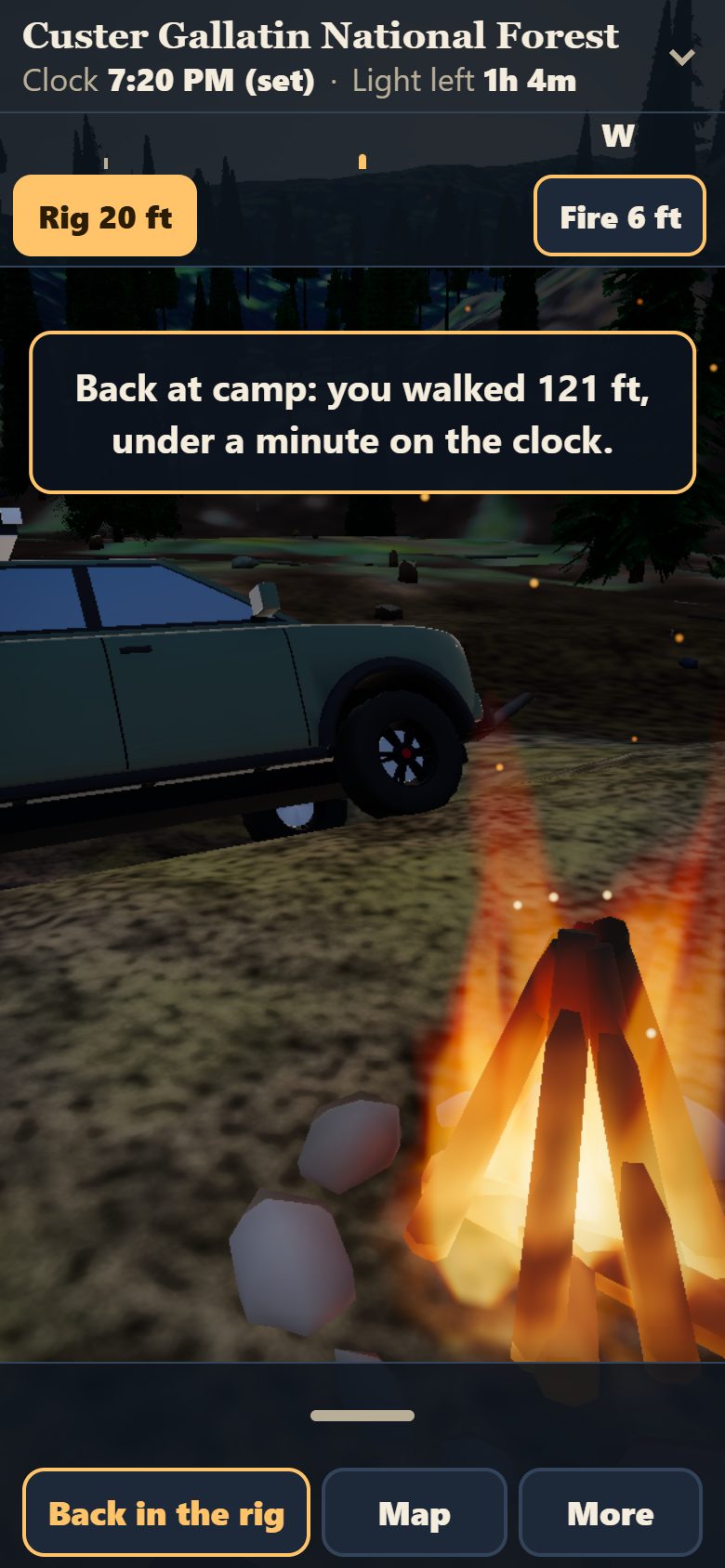
A strip under the top bar shows which way you are facing. On foot it adds a Rig button, and a Fire button while
a fire burns, each with its distance and an arrow for the way to turn. When the fire burns down, the button reads
Coals until sunrise, so you can still find it.
ButtonFire 90 ft turns you to face the fire, or its coals
Back to camp
On foot, tap Rig and you walk back to camp: you stand about 10 feet from the rig, facing it and the fire, and the
clock moves on by the walk. On an upright phone you stand a little farther back so both fit.
ButtonRig 140 ft on the compass band
Steer with the mouse
On a computer, no click needed: move the mouse toward the left or right edge of the picture and the view turns
that way, faster the farther out you go, and the rig steers with it. The middle holds still. Over a button or a
card it stops, and A, D or the arrow keys take over until the mouse moves again. Dragging the picture still looks
around.
KeysAD steer by key
SwitchSteer with the mouse: On on the Help card (computers only; on unless you turn it off)
Mouse look (L)
On a computer, the L key takes the mouse the way a PC game does, so you look around without moving to an edge.
The cursor is hidden while it is on; Esc or L gives it back, and a bar says so the whole time.
Camp
What the record says about a site, then a night there.
Campsite cards
Tap a campsite’s floating name to read what the record says: cost, season, water, elevation, fire rules and
distance. Where the record says nothing, the card says that.
TouchTap the name over the site, or its row in Drive
By itselfOpens when you arrive
Camp
At a recorded site a Camp button appears. It opens the night card: what the record says about sleeping
there, your chores, and Settle in for the night.
ButtonCamp
PhoneIn the bottom bar, at a site
Camped, and leaving camp
After you camp, a line under the top bar reads, for example, “Camped at Langohr · fire lit · chair out”, even when you come back with Continue where I left off. Try to drive away with the fire lit or the chair out and one small card stops you: Put it out and pack up, or Stay.
ButtonCamp opens your camp again
Camp chores
Before bed, tick the chores you want, each costing minutes of daylight: level the rig, the tent, Starlink,
wood, a fire, a walk for water, cooking, a cold dip.
Choose your rig
Pick a rooftop tent (5 minutes to set up, 5 to pack) or a ground tent (15 and 15), the times from Dave’s own
two rigs. It sets how long camp and mornings take.
ButtonsRooftop tentGround tent on the title screen
Your truck and hood
The hood you look over and the truck parked at camp are modeled on Dave’s own green truck, with the rooftop
tent up or a ground tent beside it.
Campfire
Tick Start a fire and a fire burns in a ring beside the rig, lighting the camp. The wood decides how long it
lasts: kindling alone is about an hour, and the camp chores spend that hour too. Add a log, or put it out in the
morning.
ButtonsStart a fireAdd a logPut the fire out
Sit by the fire
With a fire burning, pull up a chair. The clock runs faster, the sky watch tells you about moonrise, stars and
space station passes, and a friend may call.
ButtonsStay up by the fireGet up
KeyEsc gets you up
Hold your site
In the morning, leave a tent and fire ring standing to hold the site while you are away, or pack up and give it
up. A held site lasts until you close the page.
ButtonsLeave a tent to hold this site on the morning card
The sky
Tonight’s real sky over this ground.
Moon and stars
The real sky for this place and date: the Moon’s true phase, rise and set, the bright planets, and 518
catalogued stars that come out as the sun goes down.
KeyT the Clock card has the Moon’s times
Meteors and eclipses
On the night of a real meteor shower, streaks cross the dark sky. During a real eclipse of the Moon, it dims and
turns copper.
ButtonPlan a night on the Clock card sets the best hour
Point at the sky
Hold your phone up and the view follows where you point, naming the star, planet, Moon or Sun in the middle.
ButtonPoint at the sky
PhoneMore. Phones with a compass only.
Space station
Tells you when the International Space Station will cross your sky tonight, draws it among the stars, and slows
the clock while it passes.
By itselfA heads-up about 8 minutes before, by the fire
Driving by moonlight
After sunset a risen Moon really lights the ground and casts shadows. A full-moon night is drivable without
headlights; a new-moon night is nearly black.
By itselfWhenever the Moon is up after dark
Lights
For after dark.
Headlights, work lights, headlamp
Headlights throw a beam about 250 feet ahead, work lights flood the ground around the rig, and the headlamp
lights wherever you look on foot. The headlamp comes on by itself when you step out after dark.
KeysH headlights J work lights K headlamp
ButtonsLightsWork lights on the hood
PhoneDrive, then the switches
Glow
The bright band along your route, the beams over the campsites and their names, on or off together.
KeyG (N hides only the names)
ButtonGlow on the hood
Red screen (night eyes)
Turns the screen deep red on black, so it does not spoil your night vision at a real camp.
KeyR
SwitchOne line in Help, with On or Off
PhoneMore, then Help
Time, fuel and the road
Daylight is what you spend.
Clock and sunset
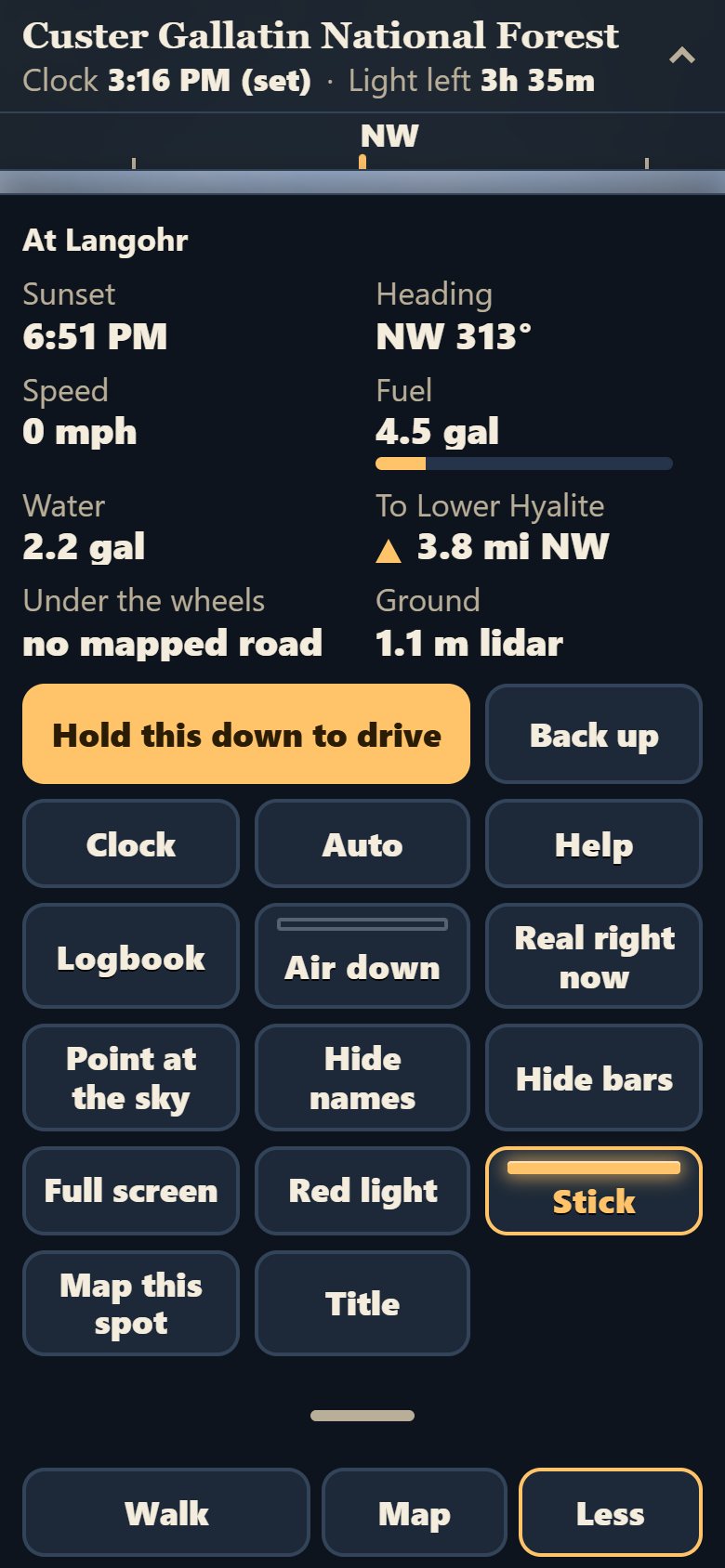
The real sun for this ground and date. The top bar shows the time, the sunset and the light left; the Clock card
lets you move the hour and watch the evening come in.
KeyT
ButtonMore then Clock
PhoneMore
Fuel and water
Gallons of fuel and water on board. Fuel burns as you drive, an empty tank stops the rig, and you can fill the
jug at a camp with water nearby.
ButtonFill the jug on the night card
PhoneThe readings are under More
Back from town
The morning card offers a run to the nearest town and back, returning with the tank and jug full, a spare tire,
and the tires aired up.
ButtonGo to town, then come back full
Trouble on the road
On rough roads you can get stuck in mud or get a flat. A card offers ways out, each costing daylight. Airing down
first cuts the odds in half.
ButtonAir down in Drive, while stopped
PhoneMore
Road-number posts at the forks
At a fork on the road map, a brown Forest Service post stands beside each road that has a Forest Service number,
with that number on its face, turned toward the traffic coming up. A road the map gives no number gets no post.
By itselfAt mapped forks, within 200 meters
Camp gear
Once you start the chores at a camp, a folding table with a lantern on it, a cooler, a water jug and a jerry can
stand beside the truck, and a camp axe and shovel lie by the fire once it is lit, all placed by the game and none of it from any record.
By itselfWith the first chore ticked, while the truck is parked at the camp
Dave, the camp neighbor
Once a season, at dusk, after your first night, Dave stands beside his own parked pickup on the shoulder of the road nearest your camp,
looking at your fire, and lifts an arm in a slow wave when you look his way. He says nothing more than one line, and he is gone by morning.
By itselfAt dusk, once a season, 30 to 60 meters from your fire
Washboard and dust
On gravel the hood shakes above 12 mph. On dirt and four-wheel-drive roads a dust cloud follows you, and a wet
forecast keeps it down.
By itselfFrom the road’s recorded surface
The ford
On the way to a creek-crossing campsite, the rig stops at the ford and offers three ways across, with the
game’s own odds of stalling.
By itselfAt the ford, in the Montana forests
Today’s real conditions
Fetched from the agencies on a schedule. With no record, the game says nothing rather than guess.
Weather forecast
Tonight’s National Weather Service forecast shows on the title screen and the night card, and sets the
clouds, the wind, the dust and the odds of mud. On a cloudy hour, clouds drift across the sky and their
shadows across the ground, the same pattern, toward where the wind blows; by night they hide the stars. The
amount of cloud and the wind are the Weather Service’s; the shapes are the game’s.
By itselfRefreshed every 3 hours
Smoke days
On a day NOAA’s satellites map smoke over this ground, the sky turns brown-orange, the sun reddens and the
stars dim. With no smoke record, the game does not call the air clear.
By itselfRefreshed twice a day
Fire rules
The Start a fire chore and the campsite card quote the fire rule the agency posts, with its source and date. The
game never stops you lighting a fire; it tells you the rule.
Creek level
Where a USGS stream gauge sits on the same creek as a campsite, the card shows its newest water height and flow,
how far away it is, and how old the reading is.
By itselfRefreshed every 3 hours
Sound and company
Off until you turn it on.
Road sound
An engine that climbs with speed and hills, gravel under the tires, washboard rattle and wind, all made in your
browser.
KeyV
ButtonTurn the sound on on the Clock card
Fire crackle
A real campfire crackling beside you (a public-domain recording), a little louder with a fresh log, then softer and
duller as it burns down to coals.
KeyV by the fire
ButtonTurn the fire sound on
Sound key
One key turns the sound on and off. By the fire it turns the crackle on and off with it.
Friend on the radio
By the fire, a friend at home asks where you ended up and answers with what the record says. You reply with a
button. It is a call when your Starlink is up, a text when it is not.
By itselfSoon after you sit down
Dave’s voice
Short lines in Dave’s own words at the moments that matter: an hour of light left, a fire lit, moonrise, a
closed gate. Being written now.
Your season
Kept in this browser, night by night.
Logbook
Every night you sleep in a forest: the cost, the light, the miles, and a picture made of squares you can copy.
Copy my season moves it to another device.
KeyB
ButtonLogbook in Drive
PhoneMore
Season book
Lays your logbook out as a book, one night to a page with your field notes, ready to print or save as a PDF, and it
never leaves this browser.
LinkPrint my season in the Logbook
Season map
The map fills in with the roads you drove and the camps you slept at. Its Picture button makes a season card to
share.
KeyM
ButtonPicture on the map
Season’s end
When a campsite’s or a road’s own dates say the season is over, or you choose to head home, a card
sums up your season.
ButtonHead home for the season in the Logbook
Field notes
Small awards for things you did, like ten nights out or a stop at the high point near sunset, kept in the
Logbook.
By itselfEarned from your own nights
Postcard
One tap makes a picture of tonight’s camp with the campsite, forest, date and Moon written on it, to share or
save.
ButtonsMake a postcard on the night card, Postcard by the fire
Share link
Sends a friend a link that puts them at your camp, at your hour, by your fire. They can sit with you or start
their own day there.
ButtonsShare this night or Share by the fire
Screen and phone
A clear picture first; everything else one pull or one key away.
Phone drawer
On a phone the picture stays clear: the bottom bar holds Walk, Map and More, and pulling it up shows every
reading and button.
ButtonMore or drag the bar up
Tap to close
Tap the picture to put away a card or the pulled-up drawer. A drag still looks around.
Key map
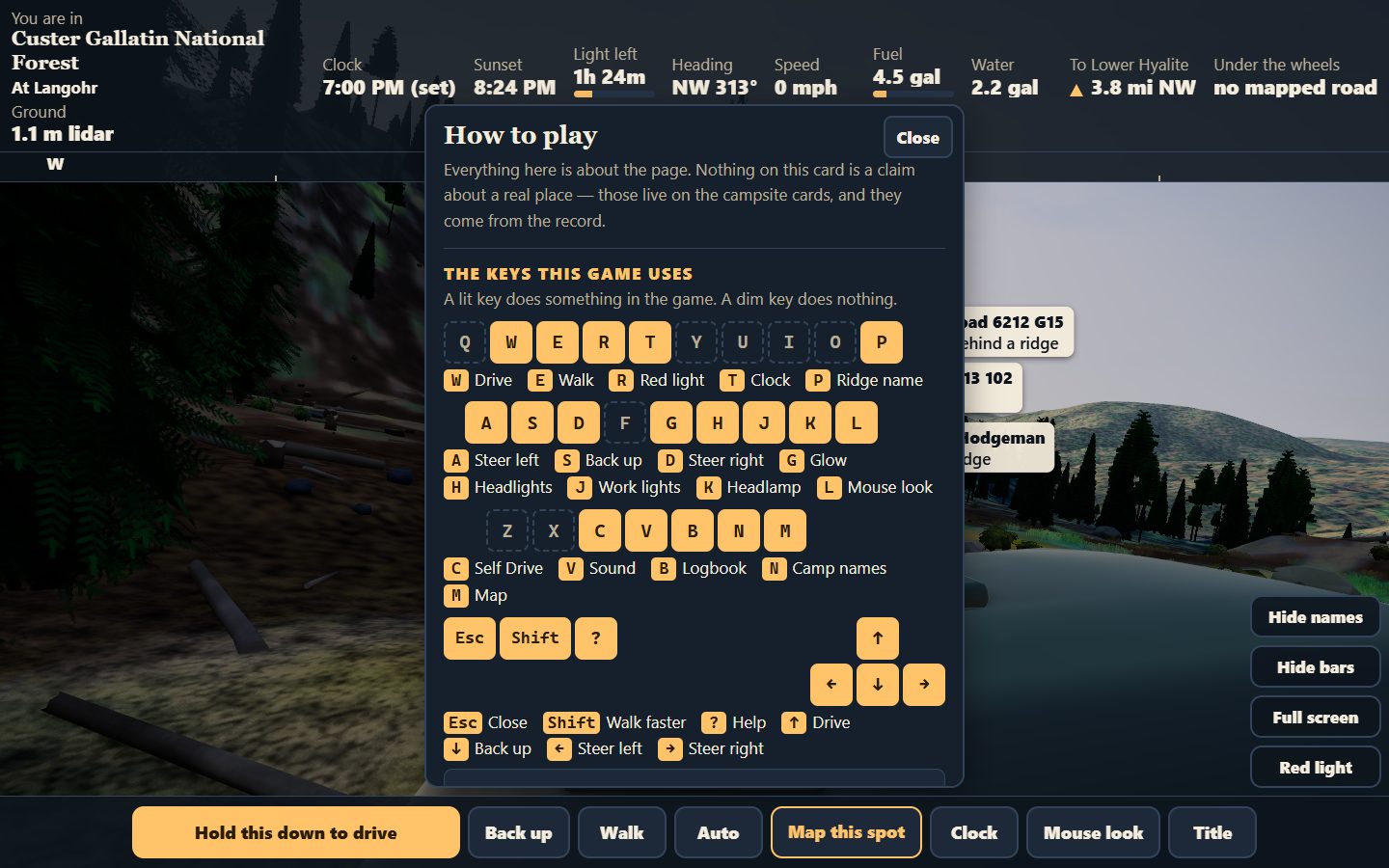
Help says what this is and why you are managing time, then shows a drawn keyboard: every key the game uses is lit and named, and a dim key does nothing.
Key? (computers)
ButtonHelp in the buttons at the right (computers)
PhoneHelp under More, for how to play
Hide names
Hides or shows the names floating over the campsites.
KeyN
ButtonMore then Hide names
PhoneMore
Hide bars
Tucks away the top bar and the bottom buttons for more forest. One tap brings them back.
ButtonMore then Hide bars
PhoneMore
Full screen
Fills the whole screen; the button says how to leave. On an iPhone, add the game to the Home Screen instead.
ButtonMore then Full screen
PhoneMore
Title
Back to the start screen, where Start becomes Back to the world.
ButtonMore then Title
PhoneMore
Keep a forest for offline
Save a forest on your device (it shows the size first) and play at camp with no signal.
ButtonKeep for offline on the title screen
Links out
From the game to the real place and its record.
Map this spot
Opens Google Maps’ satellite view at the exact latitude and longitude under the rig, with a pin.
ButtonMore then Map this spot
PhoneMore
See this site from the air
On a campsite card, opens Google Maps’ satellite view at the record’s pin for that site.
Open the real record
Opens the campsite’s own page on davelalande.com, the record the
card was read from.
ButtonOpen the real record on davelalande.com
Forest pages
Opens this forest’s page on American Adventurer, at davelalande.com.
ButtonThis forest on American Adventurer on the title screen
From the record into the game
A link to the game can name a campsite. It opens in that forest, aimed at that site, with a way back to the
record.
ButtonBack to the record on the arrival card
Keys at a glance
On a computer. Press ? in the game for the drawn key map. Shortcuts with Ctrl, Cmd or Alt
are left to your browser, so Ctrl+C still copies.
W↑Drive
S↓Back up
ADSteer (on foot, step sideways)
←→Steer
EGet out and walk, or back in the rig
ShiftWalk faster
CSelf Drive: the campsite list
MMap
BLogbook
TClock
VSound on or off
HHeadlights
JWork lights
KHeadlamp
GGlow
NCampsite names
RRed screen (night eyes)
PName the ridge ahead
LMouse look
EscClose a card, stop Self Drive, leave mouse look
?Help and About: what this is, the clock, the key map, what is real